
Enterprise Kubernetes Platform Design Dimensions
This document explores four key dimensions of Enterprise Kubernetes platform design: capabilities, control, support, lock‑in, along with the trade‑offs associated with each of them.
It begins by listing the capabilities that, in my opinion, are required for a minimum-viable enterprise‑grade Kubernetes platform.
Then, it describes each dimension in more detail and explains the trade‑offs involved.
Finally, it provides high‑level examples of how solutions from different vendors map to these dimensions, with a focus on the Nutanix Kubernetes Platform (NKP) given my work as a Nutanix partner. The same logic can be applied to other vendors.
This document is a work in progress. I’m using it to consolidate my understanding of Kubernetes from an architectural perspective and to apply insights gained during the Golden Kubestronaut journey. It will be updated in the future based on new insights gained.
This document covers only Kubernetes platforms. Depending on your requirements, a different container orchestration platform, or not using containers at all, may be a better alternative.
Out of scope:
- Continuous Integration pipelines
- Platform Engineering
I plan to cover these topics in the future.
This article is licensed under CC BY 4.0.
Minimum Viable Enterprise‑Grade Kubernetes Platform
I use the term viable because anyone can easily run containers on a hosted Kubernetes platform or in a home lab. However, running containers with the level of control and security required in an enterprise context is significantly more challenging.
Kubernetes Platform Capabilities Diagram
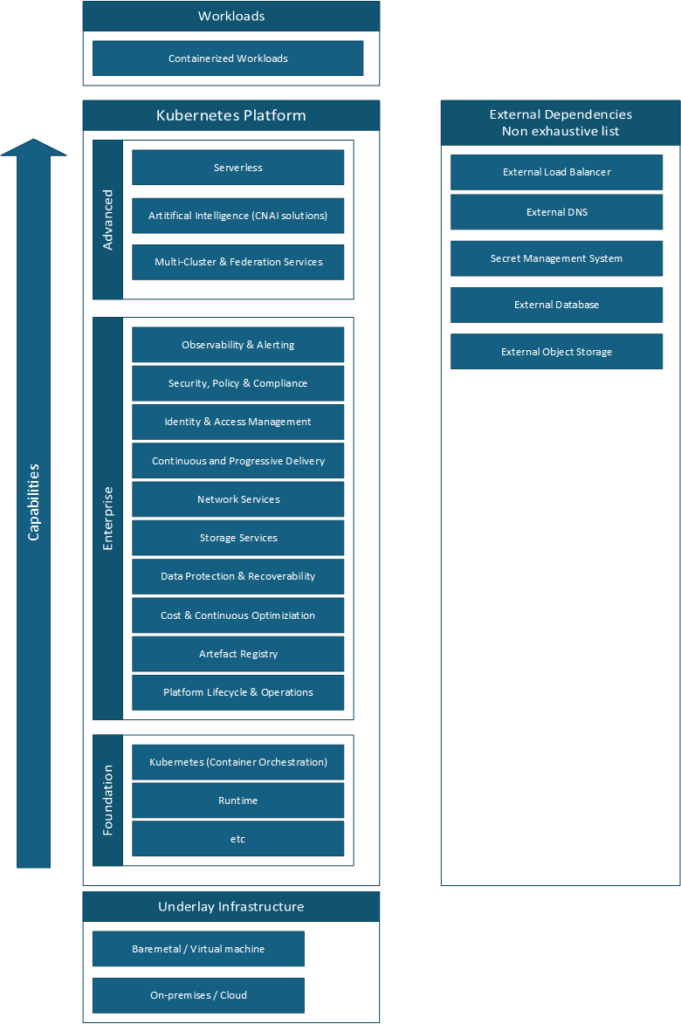
Foundation
The foundation is the bare minimum required to run containers.
It should never be used on its own in an enterprise context, for many reasons starting with security risks.
Building and operating the foundation is challenging by itself. Kubernetes is only the container orchestration layer. It is not useful without a Container Network Interface (CNI) plugin, for example.
Some tools, such as Kubeadm, can assist with installation, but in general it is easier to start with a Certified Kubernetes Distribution or a Certified Kubernetes Hosted solution. These distributions may include some of the enterprise‑grade capabilities out of the box.
This is a very short introduction on purpose. There are many excellent resources available online that go into much more depth.
Enterprise
At the time of writing, I consider that all components below are necessary for an Enterprise-grade Kubernetes platform.
These capabilities categories are not set in stone and may vary based on personal interpretation.
Each capability is illustrated with one or more example tools.
There are a lot of products available on the market, open-source or proprietary, catering to different requirements. Check the CNCF Landscape.
Observability & Alerting
Would you want your pilot flying blind and without instruments? This is similar to working without observability and alerting.
Metrics: OpenTelemetry, Prometheus, Grafana
Logs: OpenTelemetry, Loki, Fluent Bit, Fluentd, Grafana
Traces: OpenTelemetry, Jaeger, Grafana
Alerting: Alertmanager, Karma
Security, Policy & Compliance
A key takeaway from the CKS is that, with default settings, Kubernetes is insecure. For example, a user could deploy a pod with privileged rights which could compromise the node and the whole infrastructure.
Policy Enforcement: Gatekeeper, Kyverno
Secret management: external-secrets
Image vulnerability scanning: Harbor with Trivy
Certificates management: Cert Manager
Runtime scanning: Falco
Identity & Access Management
Would you let anyone enter your house? Better to know exactly who the person is and control what they are allowed to do.
Using local users on Kubernetes is deprecated. Therefore, the recommended approach is to integrate Kubernetes with an external identity provider.
This makes it possible to apply the least‑privilege principle with RBAC and grant only the necessary permissions to authenticated users.
Integration with identity provider: dex,dex-k8s-authenticator, kube-oidc-proxy, Prinniped
Continuous and Progressive Delivery
Continuous delivery is the realm of GitOps. Ideally, everything should originate from a single source of authority, which is especially useful for audit purposes.
Progressive delivery reduces deployment risks by using approaches such as canary or blue‑green deployments
Continuous Delivery: Git-Operator, ArgoCD, Flux
Progressive Delivery : Argo Rollout, Istio
Network Services
In addition to communication between containers inside the cluster, some workloads must be reachable by consumers outside the cluster.
API Gateway: Traefik
Ingress: Traefik
Load balancer: Integration with Cloud load balancer, metalLB
mutual TLS: Istio
Circuit Breaking: Istio
Advanced Network Policy: Cilium
Service Mesh: Istio
Note: Service mesh is not a capability as such but it deliver others capabilities like mTLS.
Some capabilities are redundant with Cilium.
Storage Services
If your workloads are fully stateless, you may not need this capability.
However, most applications require persistent data in some form. In these cases, workloads must integrate with storage services to store data in various formats, either within the cluster or on external storage systems.
File storage: Container Storage Interface (CSI) provider
Storage bucket: Rook-ceph-cluster
Database: cloudnative-pg
Data Protection & Recoverability
Disaster happens. It is not a question of if, but when.
Therefore, it is critical to use the right tools to ensure that data can be restored locally or after a disaster affecting an entire region.
Backup of persistent volume: Velero, Kasten
Replication of data across clusters: Nutanix Data Services for Kubernetes (NDK), Red Hat OpenShift Data Foundation (ODF)
Backup of the platform itself: On a per vendor basis
Cost & Continuous Optimization
Do you know any company that likes spending too much money?
For all others, monitoring costs and technical optimizations could drastically reduce cost.
Cost monitoring: OpenCost
Optimization: Keda with scale-to-zero
Artefact Registry
In many cases, for performance and security reasons, you will not want to download images or other artefacts from the internet each time. Moreover, versioning is critical for audit purposes.
Store multiples kind of artefacts e.g. image, helm charts: Harbor
Signatures & Provenance: Harbor + Notary
Image scanning: Harbor + Trivy
Platform Lifecycle & Operations
Ideally, you want your platform team to focus on delivering value to the consumers of the platform, not spending their time maintaining the platform itself.
Kubernetes cluster lifecycle: Cluster API (CAPI)
Application lifecycle e.g. Catalog, deployment, update: NKP Application Catalog
Advanced
These capabilities address specific enterprise requirements.
Serverless platform on top of Kubernetes; kNative
Running Artificial Intelligence workload: Nutanix Enterprise AI for inferences
Multi-Cluster & Federation Service: Istio, Cilium
Note: Centralizing the management of multiple clusters under a single control plane introduces coupling between them. For example, if one cluster cannot be upgraded, it may block upgrades for all others. As a result, this approach is not always ideal in multi‑tenant environments.
Design Dimensions
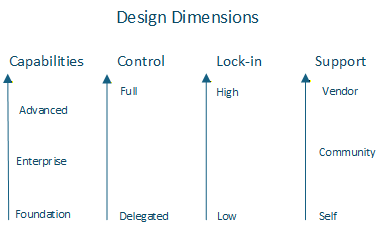
There are many dimensions involved in designing a solution, but I believe these four help to compare different options quickly and objectively.
Design Dimensions Diagram
Dimensions and Trade‑Off
Capabilities
The more capabilities you add to the platform, the more challenging day‑2 operations become.
In addition, each product expands the attack surface, so components must be kept up to date.
You need to maintain a compatibility matrix and ensure that all components continue to work together after each component or Kubernetes upgrade.
This is where an Enterprise Container Platform helps, because it provides a curated set of enterprise‑grade capabilities, and the vendor is responsible for validating upgrade compatibility across the entire stack.
Control
High control means that the customer team is responsible for the design and operations of the platform and has full access to all layers of the solution.
The highest level of control is achieved when the customer builds and operates everything independently on their own hardware, on‑premises.
It requires a highly skilled team capable of managing the entire stack.
At the opposite end of the spectrum is fully delegating design and operations to a third party, who hosts and manages the platform in a cloud environment.
Lock-in
Lock‑in has multiple dimensions.
Technical: proprietary data formats, provider‑specific integrations, etc.
Cost: migrating data out of a cloud provider, and other expenses.
Operational: dependency on provider‑specific processes, limited portability of skills, etc.
Open source vs. proprietary solutions is a sub‑topic within this dimension.
The higher the lock‑in, the more difficult it becomes to migrate to an alternative solution.
It could become a significant risk if the vendor offering is degraded. For example, price increases if the provider is taken over by a company that prioritizes profit over customer value
As a general rule, lower lock‑in is preferable, but there are scenarios where the benefits of a highly integrated or proprietary solution outweigh the limitations.
Support
The higher the support, the higher external help you will receive…at a cost.
- Self‑support
This may be the only option for self‑made solutions, such as a custom Kubernetes operator. - Community support
Assistance from community forums, blogs, and public discussions.
The quality varies, and there is no service‑level agreement (SLA). - Vendor support
You can open support cases with the vendor.
The quality is expected to be reliable and is backed by an SLA.
Underlay coupling affects control and lock-in
The underlay can be evaluated using the same dimensions.
If the solution is hosted in the cloud, it is not possible to gain full control of the underlay. As a result, regardless of how the Kubernetes platform is built on top, full control will never be achievable.
The more the Kubernetes platform relies on the underlying infrastructure provider’s unique capabilities the harder it becomes to migrate workloads to another environment.
An enterprise solution is a constellation of dimensions
Even when starting with a supported Enterprise Kubernetes Platform that provides the majority of the required enterprise‑grade capabilities, it is very likely that a customer will need additional capabilities.
These additional capabilities may come from non‑supported open‑source products or even from customer‑specific components, such as custom Kubernetes operators.
How Different Solutions Score on the Four Dimensions
I am trying to be objective in the evaluation below. However, it is still a personal judgment. Therefore, you are invited to make your own evaluation.
Build your own Kubernetes foundation on-premises
Capabilities: Foundation
Control: Highest
Support: Self
Lock-in: None
It is very challenging to build the foundation at an enterprise grade level.
Certified Kubernetes Distribution on-premises.
RedHat OpenShift
Capability: Foundation+
Control: High
Support: Vendor
Lock-in: High
RedHat OpenShift is not a pure upstream Kubernetes, therefore the lock-in High.
It provides extra capabilities that improve Kubernetes but at a lock-in cost, for example:
When using project which are “Namespace + extra capabilities”, it is not possible to apply the same configuration on any other non-OpenShift Kubernetes cluster.
Nutanix Kubernetes Platform (NKP) Started edition
Capability: Foundation+
Control: High
Support: Vendor
Lock-in: Low
NKP is a pure upstream Kubernetes, therefore migration to another upstream platform is possible while reusing the personnel skills.*
There is some lock-in in term of operations. If you use the capability of the platform to ease deployment and operations of cluster, then you have created coupling between your internal process and the platform.
*Such migrations are never straightforward. It is still necessary to adapt to the uniqueness of each platform and migrate data.
Key point: Starter must run on Nutanix on premises NCI or Nutanix in the cloud NC2.
Certified Kubernetes Hosted in a cloud provider
Capability: Foundation+
Control: Medium
Support: Vendor
Lock-in: Medium
Many certified Kubernetes Hosted are pure upstream Kubernetes.
The control is medium, customers do not have access to the management plane with such solutions.
The lock-in is medium because security do not work the same way from one vendor to another and some storage class or concepts may exist only with one vendor. In addition, migrating data out of a cloud provider is often associated with a cost.
Example:
Microsoft Azure Kubernetes Service (AKS)
Amazon Elastic Kubernetes Service (EKS)
In addition, many Cloud provider provides additional solutions that could be used in combination with the above foundation to provide the remaining capabilities.
Enterprise Kubernetes Platform on-premises
Red Hat OpenShift Platform Plus
Capabilities: Enterprise+
Control: Medium
Support: Vendor for both the platforms AND applications.
Lock-in: High
It is a combination of Red Hat solutions.
Red Hat OpenShift Container Platform provides the foundation
Red Hat OpenShift Data Foundation provides among other the capability for data replication for disaster recovery
Red Hat Quay provide the artefact registry.
Red Hat Advanced Cluster Security for Kubernetes provides security capabilities
Red Hat Advanced Cluster Management for Kubernetes provides among others observability
This is a complete and solid solution, however, it is proprietary and comes with some vendor lock-in.
One of the major advantages of the platform is that Red Hat fully owns the whole stack, It means all applications delivering the enterprise capabilities are fully supported by Red Hat.
Note: It also goes beyond Kubernetes Platform and some capabilities are in the realm of platform engineering.
Nutanix Kubernetes Platform (NKP) – Pro or Ultimate edition
Capabilities: Enterprise+
Control: Medium
Support: Vendor for the platform and partial for the applications limited to NKP related operations.
Lock-in: Low
One of the major feature of NKP is the full lifecycle of the foundation and a selection of open source solutions which provide the Enterprise Capabilities.
It is opiniated, Nutanix has made the selection of products and is responsible of ensuring that upgrade will not create incompatibility which is a major challenge when building your own Enterprise stack.
Nutanix provides support for the NKP platform, including assistance with deploying or upgrading Supported Platform Applications such as Harbor. However, Nutanix does not provide support for the third‑party applications themselves.
“Support is limited to troubleshooting for root causes up to NKP product limit. Root causes that are identified to be beyond this limit will need to be pursued by the company that creates the platform application-third-party application.”
Source: Support Policies and FAQs
It is built on a pure upstream Kubernetes limiting lock-in.
The solution itself is proprietary however majority of the leveraged products are Open Source. It is technically possible to build a new platform with the same tools and migrate data and configuration to it without vendor lock-in.
However, in such case you will lose all NKP features for example the lifecycle of such applications.
Many of the applications listed as examples in the Enterprise capabilities are part of NKP Pro or Ultimate edition.
Nutanix Kubernetes Platform 2.17 – Supported Platform Applications
Open Source software
Capabilities: +X
Control: High
Support: Community or Vendor if available
Lock-in: Low
Example:
OpenTelemetry
Proprietary software
Capabilities: +X
Control: Medium
Support: Vendor
Lock-in: High
Many technical decisions are delegated to the vendor.
Example:
Datadog
Enterprise grade Kubernetes Platform design examples
Build the entire stack yourself using only open‑source products
This gives you exactly the capabilities you need and results in almost no lock‑in, but you are fully responsible for everything and may have no support unless you purchase support for specific open‑source components.
It requires a large and highly skilled team to design, operate, secure, and maintain all aspects of the platform.
Start with a “Certified Kubernetes Distribution” and build the rest of the stack yourself
Installing and operating the Kubernetes foundation is already very challenging.
Offloading this task to a third‑party vendor helps your team focus on building the additional capabilities they require.
You can then add only the extra components you need, whether open‑source or proprietary.
Start with a “Certified Kubernetes Hosted” and build the rest of the stack yourself
This is similar to option 2, but the solution is hosted in the cloud.
In this model, you typically do not have full control of the management plane, which shifts more responsibility and control to the cloud provider.
You can still add the extra capabilities you need using open‑source or proprietary software.
Because it is hosted in the cloud, you may also leverage cloud‑native services provided by the cloud vendor.
Start with an Enterprise Container Platform and extend it if needed
Building a complete enterprise‑grade container platform is complex, especially when it comes to selecting the right products and maintaining a compatibility matrix for day‑2 operations. Starting with an Enterprise Container Platform offloads much of this complexity by providing, in addition to the Kubernetes foundation, a curated set of products designed to meet the majority of enterprise requirements.
You can extend it with additional capabilities if required.
Use a fully managed solution where the supplier is responsible for the entire platform and lifecycle
This is a full delegation model, in contrast to “control.” The customer is no longer responsible for the platform’s design, operations, or lifecycle.
In this scenario, the provider offers a “golden path” and may allow customization at an additional cost.
The service may be hosted either in the cloud or on‑premises, depending on the provider’s offering.
The supplier itself may rely on one of the previously described design options internally to deliver the service
Conclusion
Building an enterprise‑grade Kubernetes platform is complex.
These four dimensions provide a structured starting point for evaluating different options.
A key point to remember is that there is no solution that is inherently good or bad. What truly matters is whether the solution fits the customer’s requirements and constraints without introducing unacceptable risks.
If you are based in Norway and are wondering whether the Nutanix Kubernetes Platform (NKP) could meet your requirements, feel free to contact us to access our professional services.